
operation manual · iOS 0.4.646
logic behind epicMIDI
How to run 0.4.646: the pages, playback, files, and where MIDI goes.
1. What it is
epicMIDI is an iOS MIDI studio: a launch-pad sequencer, an arrangement timeline, a MIDI clip bank (plus a read-only archive), a piano roll, dual performance surfaces with a generative engine, a circle-of-fifths instrument, and (when the engine is On) a mixer that hosts third-party AUv3 generators and effects. It can make sound with a small onboard dummy synth, or run silent as a MIDI brain for other apps and hardware.
- iPhone and iPad. Adaptive interface.
- Opens on SEQ. A new project starts with one empty pattern and GEN on. The on-screen keys start collapsed, and the octave count follows the screen size.
- Pages: SEQ · RNG · ROLL · PERF · HARM · MIX. BANK is a panel on SEQ and RNG, not a page. MIX is always there. The same letter tracks run through SEQ, RNG, GEN, and MIX. Off greys them. Dummy puts a role on each track. On puts an AUv3 on each track and brings the saved rack back.
- Timebase is 1920 PPQN. Pattern STEPS are 16th notes. Arrange counts bars: 16 sixteenths per bar in 4/4.
- Every Note On is paired. Panic flushes sounding notes and sustain.
2. Chrome

Two strips sit above every page. Menus, the clock, volume, and other popouts open in their own box. Tap or swipe outside to close one.
- Top bar — logo (tap for about), record, measure, clock, the pages, volume, settings, and panic. On a wide screen the MIDI monitor sits on the right. On a phone it moves into Settings, and on a very small screen the logo goes with it. When the bar runs out of room, it scrolls.
- Pattern bar — play/stop (pinned on the left), playback (NULL / SEQ / PAT / RNG / GEN), and the pattern tiles. On SEQ and RNG the right side holds RAM and BANK. RAM’s expand and settings appear while RAM is on. The keyboard button follows BANK on RNG. SEQ adds the screwdriver and trash. On a narrow screen those buttons drop to their own bar.
| Control | Does |
|---|---|
| Logo | Tap for credits: the mark, epicMIDI, © Timothy Capelle 2026, and the chord archive credit (SHLD Free MIDI Chords, © 2019 Ludovic Drolez, MIT). Tap anywhere to close. On a very small screen the tile sits in Settings. The tap is the same. |
| Record ● | Arm. Live keys and incoming MIDI write into the active pattern, or into an armed arrange track, while playing. The button pulses red with the clock when recording. Recording stays inside the clip’s STEPS and does not grow the clip. |
| Bar.beat | Playhead readout, next to the clock. |
| Clock | Opens BPM, tap tempo, and the metronome, then time signature and length in bars. PAT loops the clip. Arrange has its own length. Slide BPM sideways, tap the number for the number pad, and tap or swipe away to close. The pad takes tenths. While playing it flashes green on the beat and brighter on the downbeat. |
| Vol | Speaker button. Opens a vertical fader, with mute under it. Mute parks the slider at 0; dragging unmutes. |
| Gear | Settings rail from the right. |
| Panic △ | All notes off and sustain off. Also sends CC120 and CC123. The button is the caution triangle. |
3. Transport
Play lives on the pattern bar, left edge, and stays pinned while tiles scroll.
| Mode | What plays |
|---|---|
| NULL | Nothing from the sequencers. Surfaces still play. HARM’s default. |
| LQD | Inheritance. The page keeps the mode you arrived with. MIX’s default. Not a running mode, so it is not on the pattern-bar menu. |
| SEQ | Grid tiles, each looping or firing by its own mode. A roll-mode row walks left to right. |
| PAT | Only the selected pattern-bar clip, looping on its STEPS. |
| RNG | The arrange timeline. The playhead only moves on the RNG page. |
| GEN | The generative surface. PERF’s default. A new project starts with it on. Opening PERF does not turn it off. |
Time signature lives in the clock popdown (2/4 … 12/8). It drives bar lines, metronome accents, and bar length. Metronome is a short click with its own level in Settings. The playhead follows the audio device, not a wall timer. If the clock jumps, notes already started are released.
Follow-playhead (the left/right triangle) on ROLL and RNG chases the playhead inside the relevant length. A 1-bar clip in a 4-bar song stays on that bar.
Lock playback mode to page is in Settings. On by default. Opening a page sets that page’s mode. Defaults: SEQ → SEQ, RNG → RNG, ROLL → PAT, PERF → GEN, HARM → NULL, MIX → LQD. LQD leaves the running mode alone. NULL still quiets the sequencers. Changing the transport menu does not turn the lock off. The next page change applies that page’s mode again. A new project restores the defaults. A saved project stores the lock and each page’s mode.
4. Pattern bar
- Tap a tile to select it (white border). Double-tap opens ROLL for that pattern.
- Hold still ~0.2s, then drag to reorder. Linear position is the pattern number; grid tiles that point at it update. A flick without the hold scrolls the bar. When the tiles overflow the strip, holding that drag on either edge scrolls the strip, and the tiles stay in place until the finger leaves that edge.
- The dashed
+stays after the last clip. Tap it to append an empty pattern and open the roll. When the tiles overflow the strip, that tap scrolls the strip so the + stays in view. Drop a pattern on it to copy that pattern onto the end. A new project starts with one empty pattern. - The selected pattern in the bar does not play from transport by itself. SEQ, PAT, and RNG do.
- Tiles inherit dest, channel, and (when Dummy is on) a dummy role. They pass those to children. Dummy off parks a role as off and remembers it if Dummy comes back.
The screwdriver is on SEQ only. Trash is on every page. Both cans accept any dragged tile. RAM and BANK live on the SEQ and RNG bars. The keyboard button follows BANK on RNG.
5. Lift / drop
| Drop on | Does |
|---|---|
| Trash (any can) | Deletes that tile, clip, or pattern immediately. A drop on a can wins over whatever sits under it. The lifted tile outlines in red, and the badge turns − over a can. |
| Pattern bar slot | Reorder, or insert a bank / GEN-RAM / archive clip as a new pattern. Bar parts existing tiles while you drag. |
| Pattern bar + | Copies the dropped pattern onto the end. The + stays after the last tile. |
| SEQ pad | Place / swap. Bank clips become a pattern on that cell, on by default. |
| Arrange lane | Insert at the leading snap. Length is the clip’s actual length — not a bar of loops. |
| Folder | Move a bank clip into that folder. |
Hold-to-delete on a can fills red for one second, then deletes the can’s active item (pattern, selected grid tile, or bank clip). A short still-hold starts a drag. A flick scrolls.
6. SEQ
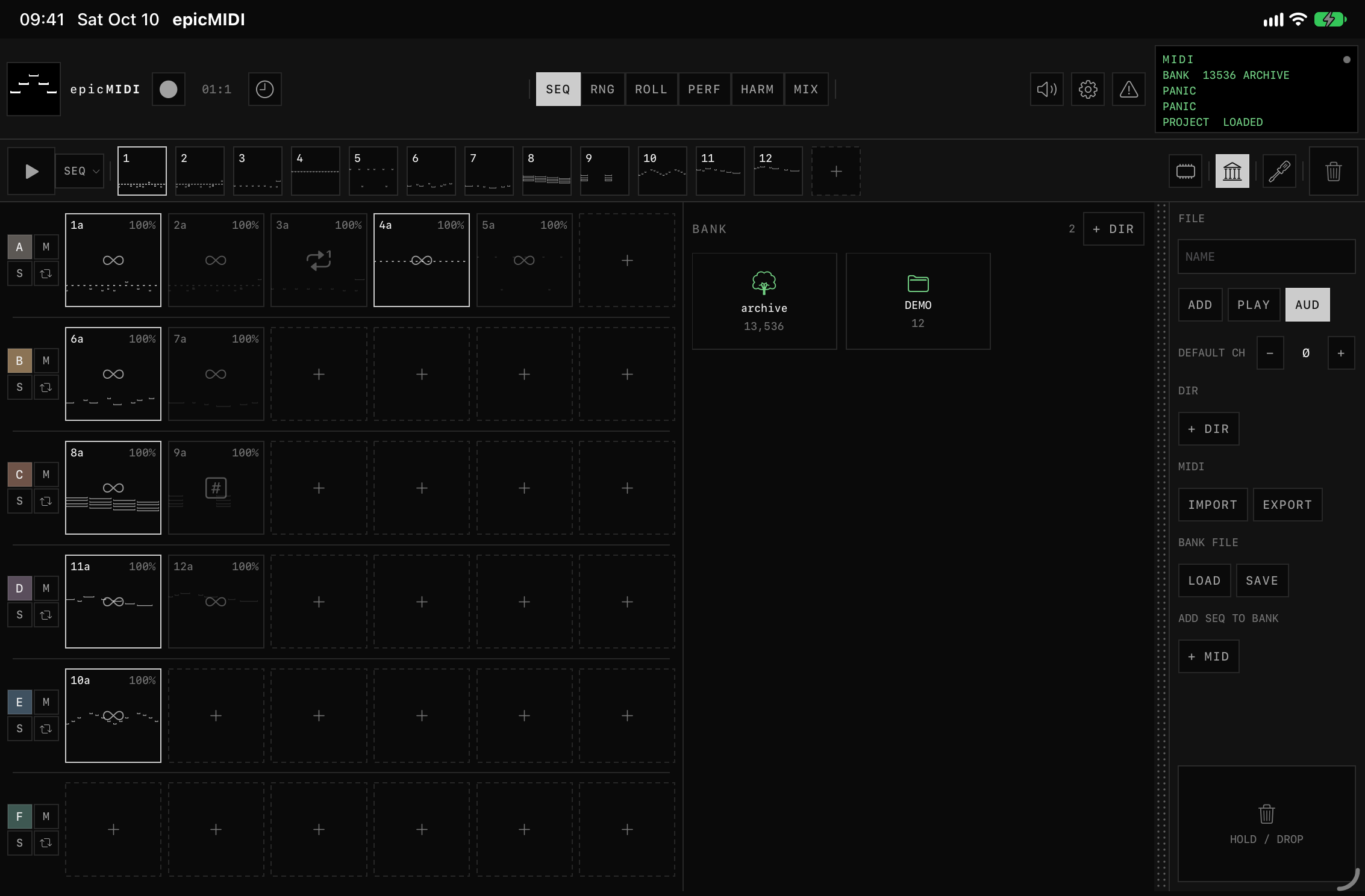
Buttons on the right of the pattern bar (or their own bar when the width is tight): RAM and BANK. RAM’s expand and settings buttons appear flush to its left only while RAM is on. SEQ is the page you are on. Edit (screwdriver) collapses the RAM and BANK panels so the grid has the room; the buttons stay. On a narrow screen the edit rail becomes a two-column panel under the grid: tile settings on the left, the grid and the can on the right, each scrolling on its own.
Rows are tracks. Track letter is a colored button (tap opens dest and channel). Mute is lavender. Solo is gold. The fourth button is roll-track: when on, that row plays left-to-right one tile at a time while SEQ is playing. Default grid is 6 × 6. Rows and columns each run from 2 to 16. The tiles stay one grid, and the spacing tightens as the count climbs.
Performance (edit off)
- Tap an empty slot’s
+to drop the selected pattern onto it. New tiles come on. - Loop: tap toggles. Playing tiles fill grey left-to-right.
- 1-shot: tap plays through once; tap again to cancel a queued or playing shot.
- Hold: sounds only while the finger is down.
- Last-touched tile is the implicit selection for delete / opening edit. No yellow outside edit. Hold-to-delete fills that pad red with the can.
Edit (screwdriver)
Opens the right rail. Tapping a tile selects it and does not trigger. Double-tap opens ROLL. A green outline marks edit mode. Hold a selected tile, then tap another slot to duplicate there. Child copies letter a, b, c after the parent number.
| Control | Does |
|---|---|
| Project transpose | Session-wide. Independent of clip transpose. Does not rewrite notes. |
| Clip transpose | This tile. Pad badge shows the sum. Rail does nothing if no grid tile is selected. |
| On / off | Whether this cell is sounding. Independent of loop / 1-shot / hold. |
| Loop / 1-shot / Hold | Marks on the pad: an infinity, a single repeat, or a numbered square. Switching to Hold clears a carried loop immediately. |
| Chance | 0–100% a loop cycle fires. Small % on the pad. |
| Undo / Redo | SEQ-edit only (32 steps). Next to GRID. |
| Sync / Free | Start quantized to the measure, or immediately. |
| MIDI dest + CH | Per-tile. Ø on the channel is off: that tile sends nothing. Omni is only In CH in Settings. New tiles inherit dest from the parent, then stay independent. |
| Edit | Opens ROLL for the pattern. BACK TO SEQ appears on the roll until you leave. |
| Bank | Opens the BANK panel on this page. Same library as the one on RNG. Edit mode hides the panel, not the button. |
| Emancipate | Bakes transpose into a new pattern, retargets the tile, appends the bar, scrolls to it. |
| GRID | Columns × rows, at the end of the rail. Swing and humanize sit under that. |
Toggled-off tiles keep a ghost of their notes. Empty unused slots stay dark.
7. RNG
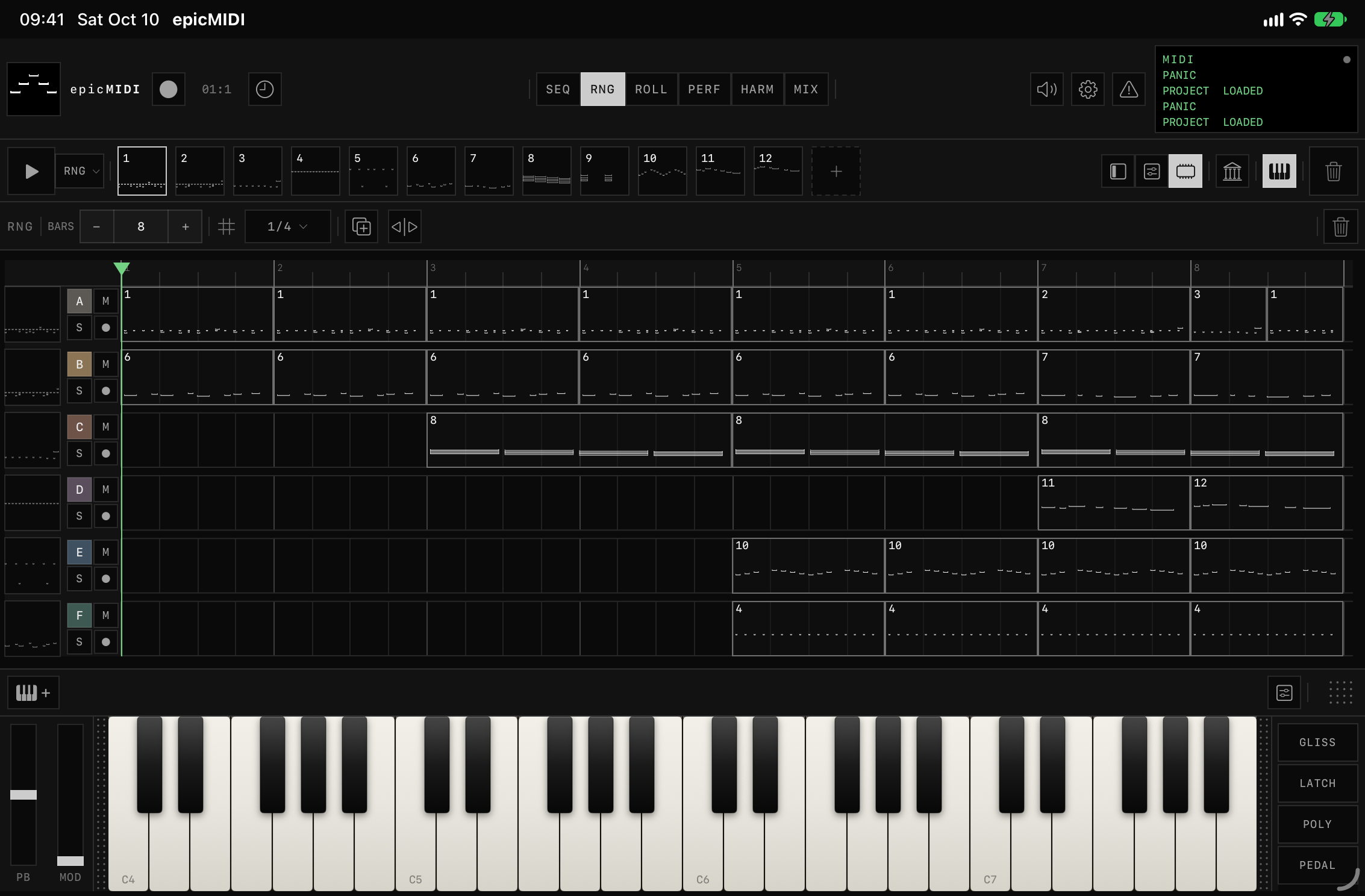
Its own page. A song editor, always editable — no side rail. RAM and BANK sit with the same buttons as SEQ, and the keyboard button follows BANK. Timeline is bars (default 8, range 1–1024). Snap is 1/1 through 1/16, plus FREE. FREE keeps the bar lines and the bar numbers. Zoom and scroll are remembered when you leave the page.
- Tap a clip to select. Drag the body to move (snaps). Drag the tail to trim / extend. Extend past the source adds empty time — hidden notes still exist, they just do not play. No looped MIDI revealed by stretching.
- Clips dropped from bank / seq / pattern bar land at the leading snap at actual clip length.
- Duplicate appends a copy behind the selection at the next free snap.
- Follow playhead uses the same button as ROLL. Tap the ruler, or drag the triangle, to seek. The track headers stay put.
- The track letter opens Out and Ch. Mute is lavender, solo is gold. Arm is a small filled circle, red while recording, and it pulses with the record button.
- Arm is the input. The track letter is the output (Out and Ch). With RNG playing, an armed track hears live keys and incoming MIDI on that output. Record writes into the clip under the playhead, in the clip’s own time, and stops at the clip end. Several armed tracks all hear and record. No clip under the playhead means you hear the track and nothing is written.
- Keyboard starts open. Closing it stays closed until you open it. New project opens it again.
Pinch on any axis is horizontal zoom.
8. RAM loop
Recent takes, on SEQ and on RNG. It is not the bank and not the pattern bar. Collapsed, a column of tiles sits beside the track heads. Expand pulls it in from the left in landscape, or as a strip under the grid in portrait. SEQ, RNG, and GEN each keep their own length, position, and whether RAM is open. The takes themselves stay one history on SEQ and RNG. It does not scroll — tiles stretch, and it will not take more than half the page. In landscape with BANK open, BANK owns half and RAM stacks with the grid in the other half. Portrait expanded RAM scrolls with the page.
Settings sit flush against RAM: length, COL to RNG (dump the column to the arrangement), GRID to RNG (converge the loop onto the timeline, appending bars if needed). A transposed pattern is a new set of notes and gets its own loop. Eight tiles show. Sixteen are kept, so a tile you are holding is not dropped when the list moves. Double-tap or drag like bank clips. GEN has its own RAM, numbered by instrument, not role.
9. BANK
BANK is a panel on SEQ and on RNG, the same library either way. It is not a page. Edit mode on SEQ hides the panel. It is the MIDI clip library — independent of the pattern bar and of the grid.
- Folders at the root. Tap a folder to enter; BACK returns. Folders save and load with the bank file.
- archive is read-only and ships with the app. KEY, KIND, MODE, MOOD, MOOD2, and STYLE each pick one value. MOOD and MOOD2 match in either order. STYLE is the progression rhythm: Straight, Pop, Pop2, Hiphop, or Soul. The files are SHLD Free MIDI Chords by Ludovic Drolez, copyright 2019, under the MIT license. That license is included with the archive. AUD plays a clip when you select it. CLR clears the filters. Loading a project, a bank file, or NEW BANK does not remove the archive.
- Tap a clip to select. Double-tap appends it to the pattern bar and scrolls to it (does not open ROLL). Hold ~0.2s and drag onto the pattern bar, arrange, a folder, or a can.
- Play in the rail auditions without the main transport. AUD trails PLAY on the user-bank rail.
+ Dirmakes a folder.Del Dirasks ARE YOU SURE? Clips stay, moved to root.- MIDI Import / Export. Type 1 SMF splits to several clips. Export bakes clip transpose. Import scrolls to the new clip(s).
- BANK FILE Load / Save is the whole library (clips + folders). Settings NEW BANK asks ARE YOU SURE and wipes clips only — not the pattern bar, not the grid.
- ADD SEQ TO BANK writes the current pattern-bar clip into the library.
10. ROLL

No ROLL label. Bar leads with PAT [#], then a scroller: STEPS · snap · outlet · key · keyboard · follow · SEL / Q / HUM · draw / erase / select / move. Undo / redo / delete pin right (plus BACK TO page until you leave).
On a narrower tall screen the bar splits. Selection, the tools, and the pins move to the second bar. A short window stays one bar. PAT # never moves.
| Tool | Behaviour |
|---|---|
| Draw | Tap plants a note at snap length and auditions it. Drag moves pitch. Tap a drawn note to delete it. Drag the body to move. Pull the tail to stretch. |
| Erase | Touch a note to remove it. A drag removes every note the finger crosses. One undo puts that stroke back. |
| Select | Drag a rectangle in any direction. Dup | move | stretch sit on the selection. Stretch (|→) pulls tails only. Independent tail-drag still works on one note inside a selection. |
| Move | One-finger pan. Two-finger pinch pans and zooms. Zooming out fits the rows, and the clip plus one bar across. |
- STEPS is clip length in sixteenths. A sideways drag stops on 1, then 16, 32, 48, and so on, from any starting length. Drag up or down for one step, or double-tap for the number pad. This control runs from 1 to 8192. A pattern already stored at 0 still plays no notes until that length changes. Snap only changes note length, not pattern length.
- The snap button toggles snap. The division menu (1/1 … 1/24) is mounted on that button. Faint verticals follow the snap. A new note centers on the cell under the finger. A bar you are holding snaps from the point you grabbed.
- HUM nudges the start and velocity of each selected note. Q moves each selected note onto the nearer snap line. A note past the middle of a division goes to the next line. On those selected notes, Q clears HUM: start and velocity go back to where they were before humanize, then the start takes that nearer line. Notes that are not selected stay as they are.
- Out and Ch sit on the outlet button. It lights when the pattern leaves Default or channel 1. Default sends to the mix track that is selected.
- The quarter-note button opens key and scale. Key is the root. Each of those notes in the gutter shows its name and octave, such as C4. Scale is the project scale, the same one as the first harmony circle. The grid and the gutter show only the notes in that scale. A note outside it leaves the row and comes back when the scale includes it. Chromatic shows every note. The button lights when the key leaves C chromatic.
- The keyboard button sits between the quarter-note and follow playhead. It shows and hides the keyboard under the roll.
- The graph under the grid is velocity, probability, pitch bend, or a controller. The closed menu stays VEL, PROB, CC1, or PB. The list spells those out, then scrolls controllers 0–119. Lanes that hold data are marked in green. Draw writes a point on each cell. Line joins the points. Curve flows through them. The point tool edits individual points. CLR asks, then clears the open lane. Two fingers zoom horizontally with the roll. With record on, an incoming controller, pitch bend, or the wheels write the open lane.
- Pitch lane runs the full MIDI range, 0–127. A pinch zooms out until that range fits, and until the clip plus one bar fits across. Snap-to-view still frames the notes.
- Snap-to-view (the eye) sits on the measure bar, left of beat 1. It fits the active steps and the used octave. It is not a toggle.
- The keyboard under the roll works like the lower PERF surface, with its own scale. Default dest follows the roll pattern’s dest, including a dummy instrument. A dest picked on the keys overrides that. The dotted grip resizes it. A short window collapses the lane to that grip; drag it back up to open the lane.
11. PERF
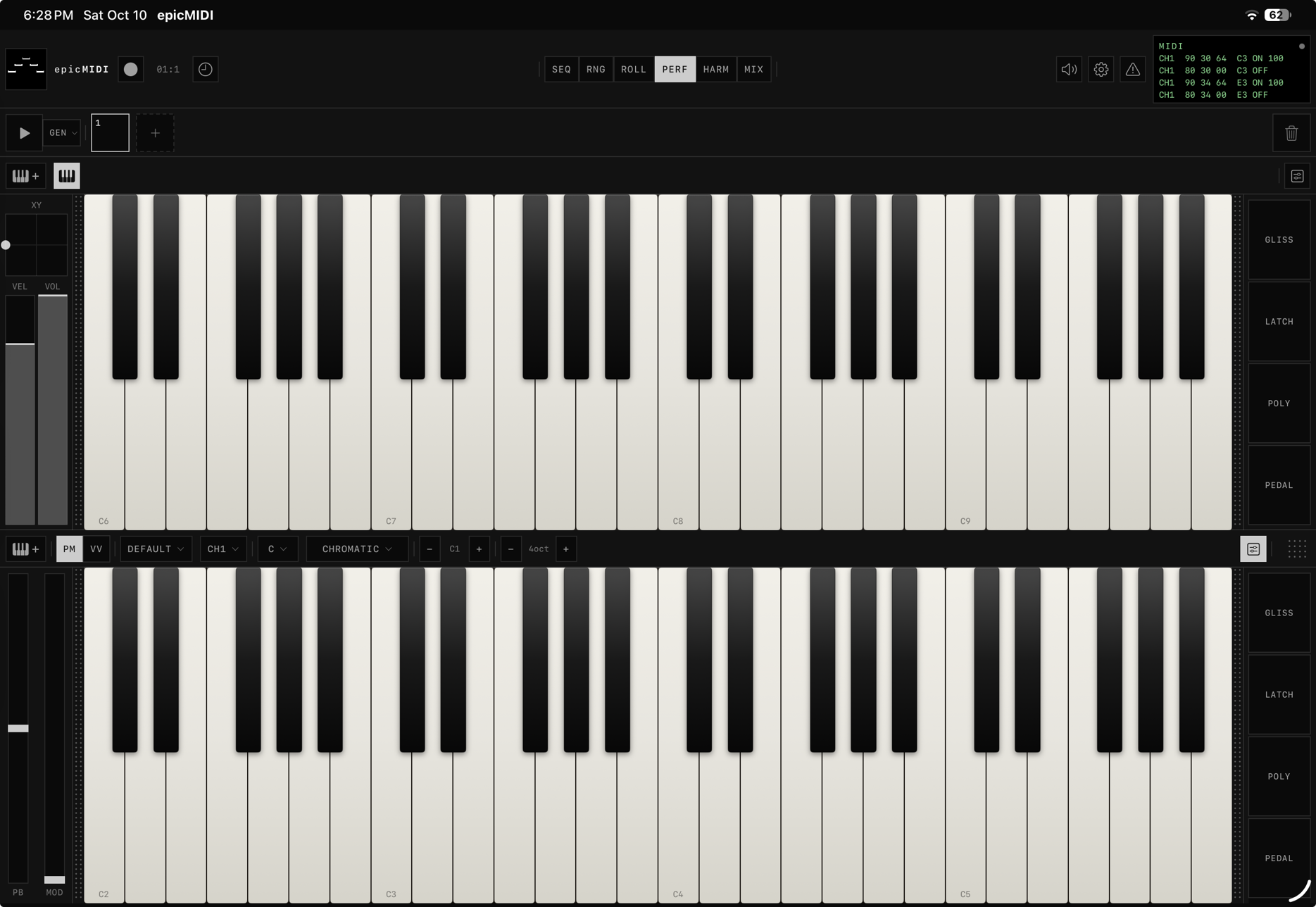
First open: GEN on the upper surface, lower off. Picking keys on the upper opens the lower at half the page. On a portrait iPhone, picking GEN opens a shorter lower strip. Drag the dotted grip to set that height. A new project clears it. You can pair keys with keys, knobs with faders, or XY with XY. Circle and pads show alone.
The lower button is the keyboard glyph. It shows or hides the lower surface. The keys button carries a +. Tap it to open the other surfaces. Settings show the rest of that surface’s controls. On a portrait iPhone, destination and channel sit behind the outlet, and scale, root, and octave sit behind the quarter-note. The bar scrolls when it does not fit. Keys start with extras closed.
In a short landscape window the two surfaces sit side by side, unless either one is keys, in which case they stay stacked. Drum pads are 3 by 4 when the window is narrow and tall, and 4 by 3 when it is wide and short.
GEN is not allowed on lower. Surfaces: keys, XY, knobs, faders, circle, pads, GEN (upper).
12. GEN
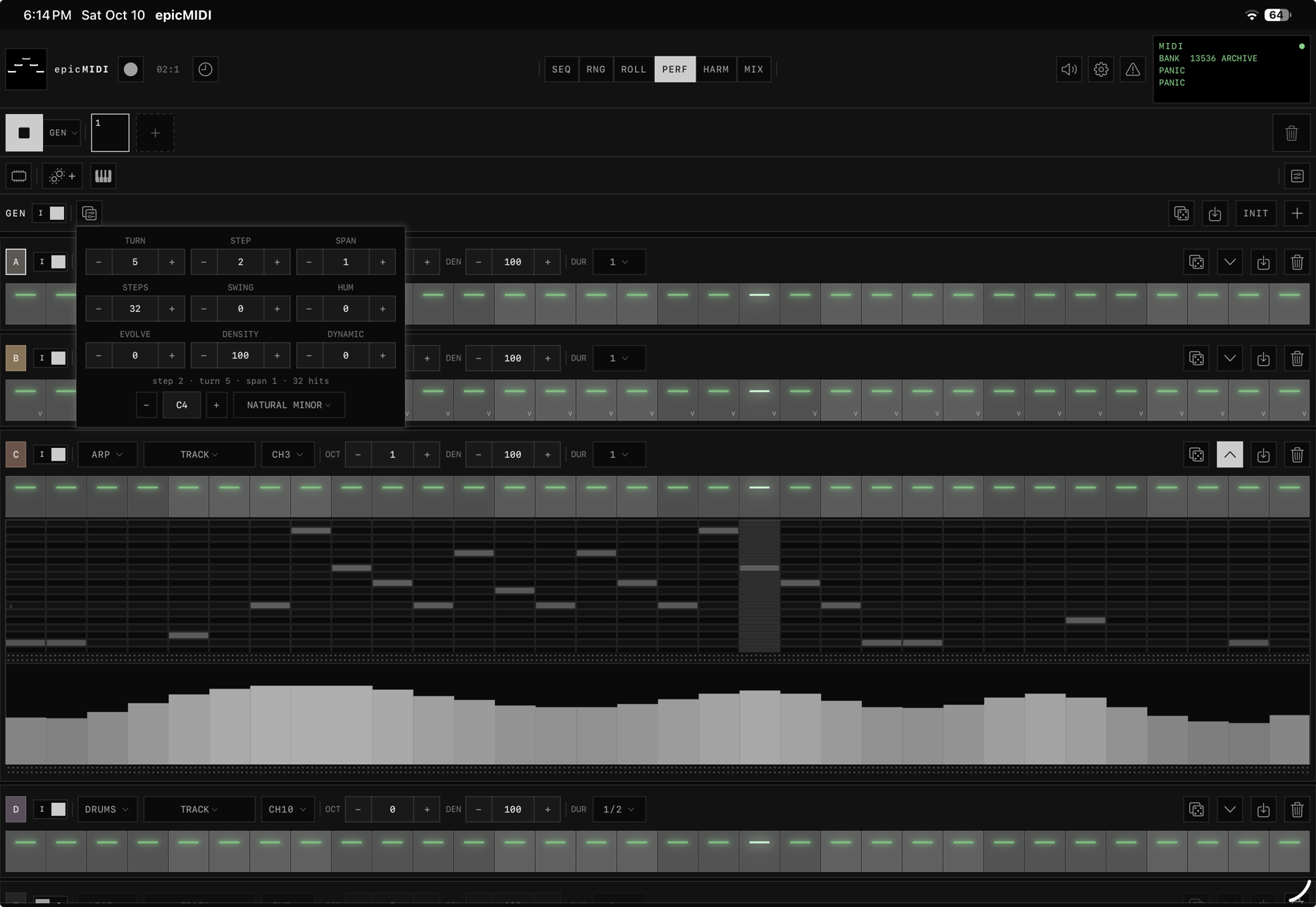
A generative MIDI surface. The step grid starts empty. GEN itself starts on. The small switches in each track header arm that track. The label shows the current state.
Dice writes one score, then every voice plays it. Bass is the chord root in the low octave. Chords are the root, third, and fifth. Arp and lead stay on those three tones and ride the same two-octave line. Drums use that grid: kick when the chord changes, snare halfway through it, hat and open hat on the other hits. The notes are ordinary MIDI. Dummy and a plug-in hear the same pitch, velocity, length, and channel.
- A new session opens six letter tracks. Bass, chord, arp, and drums start on. Lead and a second drums start off. The floor is 2 tracks and the ceiling is 16. SEQ’s rows and GEN’s plus and trash change that set on every page.
- The main bar holds TURN, STEP, SPAN, the part line, root and octave, scale, STEPS, SWING, HUM, EVOLVE, DENSITY, and DYNAMIC. The wrench folds those into a card when the bar is tight. A swipe outside closes it.
- TURN rotates the rhythm. STEP is the leap, 0 through 7. SPAN is how many steps a chord lasts: 1, 2, 4, 8, or 16.
- A sideways drag changes a number. An up or down drag scrolls the page. Double-tap a number and the number pad opens beside it. Octave is the exception: it drags in the number box and does not open a keypad.
- DENSITY and per-track DEN only open and close steps that already have notes. Key and the master octave move non-drum pitches. A track octave moves that track, drums included. Scale revoices the same part. DYNAMIC rewrites velocity. SWING and HUM only move playback.
- A fixed DUR stores that length immediately, drums included. RAND waits for the next dice, TURN, STEP, or SPAN, then rings 1, 2, or 3 steps from the line. A new drum track starts at half a step.
- Each track’s row is role, dest, channel, octave, density, and duration. Dice rerolls that track. Store writes the sounding notes to the pattern bar. Batch store writes every instrument as its own pattern. The can uses the one-second red hold.
- On a landscape iPhone the keyboard button leads the upper bar, then GEN, then dice, store, init, and add track. Reroll, the roll, store, and delete stay on each track.
- While GEN is on top, the lower keyboard belongs to GEN. Track plays the selected GEN track. Leaving GEN leaves the lower keyboard’s own destination where it was.
- Step tiles toggle on release, so the page can still scroll. A short still-hold paints. Painting a step off silences it. Painting it on locks it lit. Dice clears those locks.
- Expand opens a piano roll under the steps. Drag the grip to resize it. Drag up or down to scroll the pitches. A tap toggles a cell. The velocity lane edits sideways.
- EVOLVE walks the harmony one chord-step on a schedule and revoices every role that already has notes, drums included. Rhythm, locks, and lengths stay. EVO 0 holds the part. EVO 100 moves every loop. Dice draws a new seed, TURN, and SPAN, starts the harmony over, and writes every part. STEP stays where you left it. The grid starts empty; the first roll is already a part.
- The RAM button sits on the left of the upper bar, ahead of the surface button. Expand and settings stay flush on its left while RAM is on. It shows 8 and keeps 16. Each take is numbered by its instrument.
13. HARM

Menu: C1 OCT | C2 | dipswitch | C2 OCT | GLISS.
OCT shifts every ring of that circle by a whole octave, plus or minus 3. The dipswitch shows the second circle. Dest and channel sit at the bottom of that circle’s rail. GLISS is off until you turn it on. Expand takes the circles fullscreen.
- Hold a chord, then another — both sound. Center is a single root note and does not follow chord presses.
- Layouts in the side rail are 1/5, 1/4, and 1/12. Scale and root sit above Rings. Each ring has its own octave. Drag the dotted grip to collapse a rail.
14. MIX

A permanent page. The bar has the same Off, Dummy, and On control as Settings. The rows are the letter tracks shared with SEQ, RNG, and GEN. Off greys them. Dummy gives each track a role. On puts an AUv3 on each track. Hosted inside AUM, On is refused.
- A new project opens the first six letters. The mix bar’s plus adds a letter, up to 16. Two letters is the floor. Tap a letter to select it. Hold a letter and drag to reorder.
- Dummy roles share six voices: keys, bass, chord, arp, lead, and drums. The menu also offers the traditional names, such as piano, guitar, and flute. Volume leads the second row, with that voice’s tone sliders beside it. An empty role reads INST until an instrument is chosen. NULL clears it.
- Trash opens Cancel, Clear instrument, and Delete track. Clear drops the role or the loaded plug-in and leaves the letter. Delete removes the letter and tells you how many clips it has placed.
- The outlet opens MIDI in, MIDI out, and thru. With the engine On, effects on a track hear its MIDI in even when no instrument is loaded.
- Tap the icon or the plug-in name to open its panel under that row. The dotted grip sets the height. A project file stores each plug-in’s own state. If one is not on this device, the slot stays empty and makes no sound.
- The keyboard’s Track destination follows the selected mix letter. Another destination stays until Track is chosen again.
- FX rows have delete, wetness, and up/down. A second copy of a plug-in is named with a 2.
15. Surfaces / manuals
- ROLL / MIX key strips are copies of PERF lower (separate instances, own dest/CH/scale/surface). ROLL’s Default dest follows the pattern dest. No shared rails.
- Octave count starts from the screen: one on a phone, up to four on a wide iPad. Load and new project both take that count again. You can still change it. Octave range and root live on the menu bar while that bar is showing.
- Velocity from vertical position is off by default (a key press is a key press). Enable it in settings if you want it.
- Left rail: PB and MOD sit under the wheels.
- Right rail, keys only: GLISS, LATCH, MONO/POLY, and PEDAL. You can collapse it.
- When a strip is short, its menu folds into a … button. The height grip stays available. XY, knobs, faders, the circle, and pads fold the same way.
- Gliss: slide across keys, polyphonic if POLY is on.
- Latch: tap to hold, tap again to release. Turning LATCH off sends note-offs for anything you are not still holding — unless PEDAL is down.
- PEDAL is hold-only. Down keeps sounding notes (CC64). Up sends note-offs for notes not still pressed and not still latched.
- Mono: last-note priority. Hold C, tap E, C goes quiet; release E and C resumes. Same surface only.
- XY / knobs / faders: assignments live on that bank’s extras bar. On the circle, the outlet and CIRC stay on the bar in every orientation. Destination and channel stay in the outlet. There is no sliders button. The CIRC popout does not dismiss when you tap inside it. Pads: bottom-left is 1, left-to-right then bottom-to-top; last-hit note/vel in extras.
16. Settings

| Block | Contents |
|---|---|
| Moon / Sun | Light mode. Notes, previews, and keys shift. Keys go purer white. |
| Manual | Sits in the header, between the title and the light-mode button. Opens this book in the app, filling the page. Close returns to Settings. The link at the top opens epicmidi.com/manual. |
| PROJECT | New, Load, Save, SMF, and Demo, then Import and Export. Load and Save use the library inside the app. A name already there asks before it replaces the file. SMF writes Type 1, one track per pattern. Import and Export move a file in or out. Demo loads oxide-lattice. |
| BANK | New / Load / Save the MIDI clip library only. New Bank does not touch the pattern bar or grid. First launch seeds kit clips plus the archive. |
| AUDIO ENGINE | Off / Dummy / On, same control as the MIX bar. Off is pure MIDI and greys MIX. Dummy is the role synths, edited on MIX. On is the AUv3 host; leaving it keeps the rack for the next On. On is standalone only. The MIDI processor plug-in stays Off. The instrument plug-in is Off or Dummy. Metronome level. Background audio toggle (default off). |
| MIDI ROUTING | Input port, In CH (Ø / Omni / 1–16), MIDI thru. Dest and channel live on each surface. No master Out CH. MIDI In defaults to Ø. |
| MIDI CLOCK | Off / Int (sends clock to the output and the epicMIDI port) / Ext (follows incoming start/stop/clock). |
| PLAYBACK | Lock playback mode to page, with one menu per page. |
On a narrow screen the MIDI monitor migrates here. BPM stays behind the clock.
17. Files
| Kind | Default name | Contains |
|---|---|---|
| Project | .epicproj | The song and the session: patterns, the grid, the timeline, the mixer, GEN, both circles, the performance surfaces, routing, clock, and the page lock. Notes you are holding, the pedal, light mode, and background audio stay on the device. |
| Bank | .epicbank. project + “ bank”, or “bank” | MIDI clips and folders only. Archive is app-shipped and is not stored in the project or the bank file. Loading either puts the archive root back if it was missing. |
| MIDI clip | clip title | SMF. Type 0 = one clip. Type 1 import = one clip per track. The time signature in the file is the clock’s. |
| Project SMF | session / project name | Type 1. Conductor + one named track per pattern-bar clip. Transpose and channel baked. The conductor’s time signature is the clock’s (2/4 … 12/8). |
The app also keeps a recovery copy of the session and opens it on the next launch. Projects and project SMFs live in the app’s own library. Import and Export are how a file moves in or out. The standalone app and the plug-in each keep their own library. The recovery copy does not contain the clip library. That already lives in the bank. The recovery file is not in the Load list.
Settings → Project → Demo loads oxide-lattice, the song shipped in the app and in the plug-in. Eight bars, D dorian, 104 bpm, 4/4. SEQ opens as the live rig. RNG is the arrangement. GEN opens in D dorian with the song. The surfaces start fresh. MIX opens on Dummy. The letters are drums, bass, chord, lead, arp, and drums again, and the mix keyboard starts on Track.
18. MIDI I/O & clock
- Virtual source: epicMIDI. Virtual destination: Epic MIDI In. Own packets are not re-ingested.
- In CH: Ø ignores channel voice (clock still works). Omni accepts all.
- Dest + CH are per surface. The monitor prints that surface’s channel. Thru does not remap to a global Out CH (there isn’t one).
- You can change ports while playing.
- Background audio is off until you turn it on. Then MIDI keeps flowing when the app is minimized.
- CC1 = mod, CC64 = sustain, pitch bend, CC120/123 = panic. Note On velocity 0 = Note Off.
- Resolution is 1920 ticks per quarter note. MIDI clock is 24 per quarter. Song position follows the audio clock. External clock follows incoming MIDI clock.
The green monitor is a 4-line trace. It is not a log you can export. MIDI 2.0 is not implemented.
19. AUv3
| Where | What epicMIDI is |
|---|---|
| Standalone app | AUv3 host. MIX is always a page. Engine On loads App Store generators and effects. The plug-in UI expands in the mixer row. MIX keys target the expanded unit only. |
| Inside AUM / Logic / GarageBand | Two plug-ins. epicMIDI is the MIDI processor. It sends MIDI through the host and does not play. epicMIDI Engine is the instrument. Dummy puts a role on each track and that sound leaves the stereo output. Neither hosts other plug-ins. |
The dummy synth is a small set of voices: keys, bass, chord, arp, lead, and drums. Standalone Dummy uses it. The instrument plug-in uses it too. The MIDI processor does not. Its output stays silent, because the host is the one making sound.
20. Gesture sheet
| Where | Gesture | Result |
|---|---|---|
| Any tile | Hold still ~0.2s, then move | Lift. Scroll cancelled. |
| Any tile | Flick / pan before 0.2s | Scroll only. |
| Pattern bar | Hold a tile on either edge | When the tiles overflow, the strip scrolls. Tiles stay put until the finger leaves the edge |
| Pattern bar + | Drop a pattern | Copies that pattern onto the end. The + stays put |
| A number box | Brief still, then slide | Change the value. The − and + buttons are taps, not the drag. |
| GEN steps | Release / paint after still | Toggle. Page scroll wins if you move first. |
| GEN roll | Drag up or down | Scroll the pitches. A tap toggles a cell |
| Roll grid | 1 finger (draw / erase / select / move) | Plant / erase / select / pan |
| Roll grid | 2 fingers | Pan + zoom. Horizontal zoom is shared with the lane. Cancels a just-planted note |
| Measure bar / piano keys | Pinch | Zoom horizontally / vertically |
| Arrange ruler | Tap / pinch / drag triangle | Seek / zoom X / scrub |
| Automation lane | Draw | Writes the division under the finger. Bar holds the cell. Line joins the points. Curve flows through them. |
| Automation lane | 2 fingers | Pinch zooms horizontally, the same zoom as the roll. |
| Automation lane | Point, tap | Add a point. Double-tap removes one. |
| Automation lane | Point, drag a point | Move that point. It stays on its division. |
| Lane gutter | Drag up or down, or hold | The wheel writes the open lane while record is armed, including while the finger stays still |
| Automation lane | CLR | Asks, then clears the open lane |
| PEDAL | Hold | Sustain (CC64) |
| Dotted grip | Drag | Resize a lane, the keyboard, or a plug-in panel |
| Home indicator | Swipe up from the bottom | One swipe leaves the app |
| Trash | Hold 1s | Deletes the can’s active item |
| Bank / RAM clip | Double-tap | Append to pattern bar |
| Pattern / SEQ pad (edit) | Double-tap | Open ROLL |
| Circle | Multi-touch | Multiple chords held |
| Popout | Tap inside | Stays open. Tap or swipe outside to dismiss. |